
DJI Phantom 3 & 4: Which Micro SD Card Is Best?
There are an insane number of micro SD cards on the market and knowing which ones are a good fit for your DJI Phantom is no easy task.
First there is a question of size, then there are all those crazy codes on the card (UHS-I Class 10, etc).
There are a few other factors worth keeping in mind too, such as how you are going to use it and how patient you are when downloading your files.
But first, let’s take a look at the simple answer of which micro SD card is the best for the DJI Phantom 3 or 4.
Note: You can use the navigation on the right to jump to a specific section.
The Simple Answer: Which Micro SD Memory Card For Your Phantom?
First, what does DJI recommend:
Phantom 4 – micro SD cards up to 64GB with UHS-I
Phantom 3 – micro SD cards up to 64GB with UHS-I Class 10
So, just to fit those requirements, the following two cards from one of the best SD card makers out there (SanDisk) will certainly fit the bill:
SanDisk Extreme 32GB microSDHC UHS-I Card with Adapter
SanDisk Extreme 64GB microSDHC UHS-I Card with Adapter
What Is The Largest Size SD Card The Phantom Can Handle?
DJI only recommends up to 64 GB which means they do not test the Phantom or guarantee that it will work.
However, there are lots of posts on the forums where people have used higher-sided SD cards like 128GB.
Should you buy one? I honestly think 128GB is overkill because you will almost never fill it, even over numerous flights. Unless you plan on always keeping all your footage.
However, if you have one already, give it a try. Just don’t forget to make sure it is formatted in the exFAT format.
Top Product Overview
![SanDisk Extreme 32GB microSDHC UHS-I Card with Adapter - SDSQXVF-032G-GN6MA [Old Version]](https://m.media-amazon.com/images/I/41oALGS7riS._SL75_.jpg) | SEE ON AMAZON → | |
 | SEE ON AMAZON → | |
 | SEE ON AMAZON → | |
 | SEE ON AMAZON → | |
![SanDisk Extreme PLUS 32GB microSDXC UHS-I/U3 Card with Adapter (SDSQXSG-032G-GN6MA) [Newest Version]](https://m.media-amazon.com/images/I/41G+dJrhYXL._SL75_.jpg) | SEE ON AMAZON → | |
 | SEE ON AMAZON → | |
 | SEE ON AMAZON → | |
 | SEE ON AMAZON → |
The Best Micro SDs for The Phantom
Here are a few top-notch micro SD cards that should be just right for your Phantom 3 or 4. Of course, there are lots of other options, but for quality and storage vs price, you can’t go past the SanDisks.
SanDisk Extreme 32GB microSDHC UHS-I Card with Adapter
![SanDisk Extreme 32GB microSDHC UHS-I Card with Adapter - SDSQXVF-032G-GN6MA [Old Version]](https://m.media-amazon.com/images/I/41oALGS7riS.jpg)
Product Information
- 32 Gig
- UHS Class 3
- Video speed Class 30 (V30)
- Write Speed 90Mbit/s
- Read Speed 60 Mbit/s

Product Information
- 64 Gig
- UHS Class 3
- Video speed Class 30 (V30)
- Write Speed 90Mbit/s
- Read Speed 60 Mbit/s
Other Things To Consider When Buying A Micro SD
Size is not everything.
Seriously. Buying a 64GB card to give yourself the maximum capacity seems like the best idea…
But sometimes, combinations of smaller cards might be a better idea.
Here is why.
How Long Will You Fly For?
Once you land and can download your footage onto your computer, do you need to keep it on the SD Card?
Most flying sessions will only leave you with an SD card partially filled. Even a 16GB card will most likely not be filled by most people;
Most experienced Phantom pilots will tell you that a 32Gig is large enough for sure.
However, if you
- Plan to fly for really long periods
- Want to store your footage on the cards for longer periods (traveling, work session, etc)
- Just to ensure you don’t run out of space
Then I would grab the 64Gig micro SD card to be safe.
How Long Can You Wait When Downloading Your Files
The read speed of your SD card will determine how fast your files can be transferred to your computer. And when you are talking about 10s of Gigs that can take time!
The speed of your micro SD is measured in two ways:
- Write speed (the speed at which data can be saved on the card – relevant for the drone to save movies)
- Read speed (the speed at which you can get the data/files off the card)
Look for class 3 when you are wanting to take 4K footage. That is the minimum write speed that is recommended by the SD card specification. That means you are good to go for shooting video.
Downloading is another story.
The SD cards I recommended above have a write speed of 60 Mbits/s. What that means is not important. Just think “60”.
If you want to download files even faster, you can get cards that do 90 or 95Mb/s as well. That is 50% faster or more!
Here are a few cards that are 90MB/s and faster:
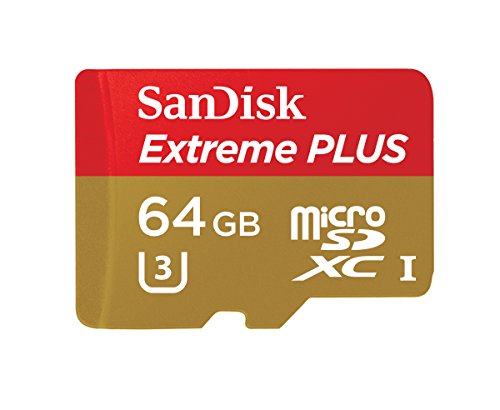
SanDisk Extreme Pro 32GB (90Mb/s)


![SanDisk Extreme PLUS 32GB microSDXC UHS-I/U3 Card with Adapter (SDSQXSG-032G-GN6MA) [Newest Version]](https://m.media-amazon.com/images/I/41G+dJrhYXL.jpg)


Do You Want To Store The Files On SD Or Have More Cards In Case?
Having multiple cards on hand when you are flying is always a good idea.
You might want to swap out cards at various points during a session or vacation.
So, instead of a 64Gig card, some people like to go with multiple 16G cards or 32GB cards instead of say, one 64GB.
That way you can:
- Swap out cards after key footage/shots to ensure you have the data in hand
- Keep certain files safe or even stored on SD Cards for the long term
- Change SD cards when you change batteries to have each session separate
Although this does not suit everyone’s flying or shooting style, it is often a better way to go than just one 64GB card.
