
DJI Mavic Air: The Best Filters (ND and Polarizer)
Choosing the best set of filters for your Mavic Air Drone is tough.
At A Glance: Our Top Mavic Air Filters
- Best ND Only Set Polar Pro Mavic Air FiltersJump To Review
- Best ND/Polarizer Set Sandmarc Mavic Air FiltersJump To Review
- Best Value FStop Labs Mavic Air FiltersJump To Review
They have a big effect on the quality of any video you take, especially if you incorporate motion blur, which is when things move in the shot. Without the right motion blur, it just looks unnatural.
The other thing to keep in mind is quality. The glass has to be good enough to allow the drone camera to do its job as well as ensuring the normal operation of the gimbal (badly designed filters can stop the gimbal calibrating on startup). So, you want to make the right choice.
Although it is early days with the Mavic Air and there is not yet a lot of information on filters, I have collected everything I could find and sorted it all out below for you to make the best decision.
Just keep in mind a few important things (more details on all this at the bottom of the review, this is just a summary:
1. ND Filters enable you to get the right shutter speed for non-flickering shots. On very sunny days you can need up to ND32 (they come in multiples of 2, starting at 4)
2. Polarisers are less important, they reduce the glare/reflection off of anything wet (including water :>) and glass. You can get them alone, or most often in combo with NDs. But, you have to get the angle right and shoot in the right direction for it to help in some cases.
3. UV filters are mostly pointless and are often used just as lens protectors.
Top Product Overview
 | Best ND Only Set | SEE ON AMAZON → |
 | Best ND/Polarizer Set | SEE ON AMAZON → |
 | Best Value | SEE ON AMAZON → |
 | CHECK THE LATEST PRICE → | |
| SEE ON AMAZON → |
Polar Pro Mavic Air Filters

Polar Pro has been creating top-end drone gear since way back in the DJI Phantom days (I know, it just seems like yesterday, right?).
I own a set of their ND filters for my Mavic Pro and they are super-high quality. They are always improving on the designs as they learn more about the drones, so don’t be afraid to give them feedback.
They are one of the first companies (no surprise) to create Mavic Air filters, and they have a huge selection to choose from.
The main difference (as you can see in the detailed table) is whether they are ND or ND/Polarizer combination filters. They also have a plain UV filter (great for protecting the lens) or a higher stop (32/64) set called Limited, if you work in brighter conditions (water, snow, beaches, etc).
They also differentiate between their Standard and Cinema series (black vs gold in the images below). The Cinema has multi-coated glass with higher quality optics if that matters to you.
Also, keep in mind that the Mavic Air comes with a UV filter already and that screwing filters on and off is very easy (compared to other drones from DJI).
Check the links below to see the Polar Pro Mavic Air Filters on Amazon:
Polar Pro ND Filter 3 Pack (Shutter Collection)
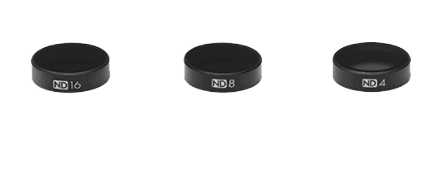
ND Filters: 4/8/16
Glass Quality: Cinema Series production grade multi-coated glass
Filter Weight 1g = 0.03 oz: 0.59 g
Polar Pro ND/PL Filter 3 Pack (Vivid Collection)
ND Filters: 4/8/16 – Polarizers: ND/PL – 4/8/16
Glass Quality: Cinema Series production grade multi-coated glass
Filter Weight 1g = 0.03 oz: 0.59 g
Polar Pro ND Filter 3 Pack (Shutter Collection)
ND Filters: 4/8/16
Glass Quality: Standard Series Optical HD glass
Filter Weight 1g = 0.03 oz: 0.59 g
Polar Pro ND/PL6 Pack (Standard Series)
ND Filters: 4/8/16
Polarizers: ND/PL – 4, 8, 16
Glass Quality: Standard Series Optical HD glass
Filter Weight 1g = 0.03 oz: 0.59 g
Polar Pro ND/PL 6 Pack (Cinema Series)
ND Filters: 4/8/16 – Polarizers: ND/PL – 4, 8, 16
Glass Quality: Cinema Series production grade multi-coated glass
Filter Weight 1g = 0.03 oz: 0.59 g
Polar Pro ND/PL4 Pack (Limited Collection)
ND Filters: 32/64 – Polarizers: ND/PL – 32/64
Glass Quality: Cinema Series production grade multi-coated glass
Filter Weight 1g = 0.03 oz: 0.59 g
Sandmarc Mavic Air Filters

Sandmarc is quite new to the filter game from what I can see. When I first reviewed all the Mavic Pro filters these guys were actually nowhere to be seen (2017). However, since then, they have gotten mostly 5-star reviews for their products, at least for the Mavic Pro and Phantom.
Their Mavic Air filters are too new and not yet on Amazon, so I could not find any reviews, but if they stack up against their others, they should be a good buy.
Like Polar Pro, they have quite a few combos (polarized and ND) worth checking out. I have compared them in the table below to make it easier for you. If you do buy them, let me know how they go.
The main sets are plain ND filters (one with a simple polarizer too) and combination ND/Polarizers, the last one with a standalone polarizer too.
Check the links below to see the prices of the Sandmarc Mavic Air Filters:
AERIAL PLUS ND FILTERS (3 Set)
ND Filters: 4/8/16
Filter Weight 1g = 0.03 oz: 1 g
ND Filters: 4/8/16
Filter Weight 1g = 0.03 oz: 1 g
PRO FILTERS – ND/PL Combo (4 set)
Polarizers: Combo – ND/PL – 4, 8, 16, 32
Filter Weight 1g = 0.03 oz: 1 g
PRO FILTERS – ND/PL Combo (6 set)
Polarizers: ND/PL – 4, 8, 16, 32, 64 & Single PL
Filter Weight 1g = 0.03 oz: 1 g
FStop Labs Mavic Air Filters

Another interesting option is the filters from FStop Labs. These guys make a lot of stuff for drones, but do not have as much experience or product range as those two above.
They have only two main options: the ND4 – 16 range (3 filters), and the ND 32 & 64. Both sets come with the ND and ND/Polariser combo.
To be honest, I would go with the ND4 – 16 range and see if you really need a 32 or 64. If you shoot often in very sunny/bright conditions, then yes. But not all of us live in such places.
These filters are also a bit cheaper than both the PolarPro (which are probably some of the best) and Sandmarc (which are a great option too). The only downside most people complain about is that the case the filters come with is too large. And that is not a big issue, is it?
Check the links below to see the FStop Labs Filters on Amazon:
FStop Labs ND4, ND8, ND16, ND4/CPL, ND8/CPL, ND16/CPL
ND Filters: 4/8/16
Polarizers: 4/8/16
FStop Labs ND4, ND8, ND16, ND4/CPL, ND8/CPL, ND16/CPL & UV
ND Filters: 4/8/16
Polarizers: 4/8/16
UV Filter: ✓
Polarizers: 32, 64
FStop Labs ND32, ND32, ND/PL 32, ND/PL 64
ND Filters: 32, 64
Polarizers: 32, 64
Other Mavic Air Filters
DJI Mavic Air ND Filters Set
DJI themselves always comes out with a simple filter set, which might be worth checking out if you want to order directly from them.
They are an ND 4, 8, and 16 set.
Deylaying Camera Lens Filter Set
I have also seen a whole bunch of unknown brands who seem to be selling the same filters under different names. Not sure I really trust the quality of these filters, but I thought I would let you know about them anyway.
Just in case you are not up to speed on the uses and reasons for even owning these kinds of filters, I have written a detailed explanation below.
It is worth reading all of it if you are unfamiliar with the world of cameras, video, and filters.
Camera Filter Types
There are two main types of filter you will want to consider for your Mavic Pro:
- ND – Neutral Density Filter
- CP – Circular Polarizer Filter
The most useful one is the ND, so if you have to choose, go for that.
Here is what they both mean and do in detail.
Neutral Density Filters (ND Filters)
A neutral density filter is kinda like a pair of sunglasses. It makes everything darker.
It is designed to only do that. Nothing more.
Why would you want your image or video darker? Because of how cameras & video cameras work.
When you are shooting a video you want to have a shutter speed that is about double your frame rate.
So, if your frame rate is 24 fps on the Mavic, you will want a 1/48 shutter (which does not exist, so go for 1/50)
And likewise, if you have a framerate of 30fps, then you would select 1/60.
The Problem
But the problem is when it is in broad daylight (not early morning or late afternoon) you have WAY TOO MUCH sun to get a shutter speed of 1/50.
Even if you reduce the ISO to 100, you will usually not achieve that. Try it.
The Solution
A Neutral Density Filter (or ND filter for short).
By adding a neutral density filter you can remove so much light that you can get down to your “ideal” frame rate VS shutter speeds for video.
And trust me when I tell you that if you are serious about having smooth, not jumping or bad edges on your video – you want to do this right!
Depending on just how light it is (midday full sun, or just a bit cloudy) you will have to use different ND filters. That is why they come in sets of 3 or 4. Each one blocks a different amount of light.
Circular Polarizer Filters (PL/CPL Filters)
These babies are a little bit different because they are only useful in specific situations.
The main idea with the circular polarizer is to reduce reflections or make things like the sky bluer.
Circular polarizers take advantage of a principle in physics where they can block light not aligned in a specific way.
The result is that they are great for when you are shooting on very bright days:
- Around water (where there is lots of reflection)
- Around buildings (again lots of reflections)
- With a lot of sky (Landscape shots look way bluer with these filters)
There are loads of reasons to have and use a polarizer and it is something you want to consider when buying your Mavic Pro filters. Some sets come with them. Others have them with the ND filter itself. Others don’t have them at all.
POLARIZER TIP: Because the polarizer has to be correctly aligned in order to block out the light (block reflections or make the sky bluer) you usually need to add them after the drone is turned on so that you are sure that it is correctly aligned.
A Bonus Use For Filters
Another thing to think about with filters is that they ultimately protect your lens. It is far easier and cheaper to replace a filter than your whole Mavic Pro Camera.
If you crash or even have something hit the lens when you are flying it might scratch the camera. But, with the filter on, you can just replace that instead!
It is a common use of filters in photography and sometimes they just give you a UV filter which in reality is just a lens protector!
What To Look For In A Filter / Filter Set
Of course, you want a good quality filter that has lots of positive reviews online, but what else should you look for?
Here are a couple of things I suggest you look for in a Mavic Pro filter:
- It’s easy to attach and remove
- The filter set has the different filters you need
- It allows the gimbal to calibrate
Let’s look at these in more detail so you get what I mean.
Easy To Attach & Remove
These filters have to be attached and removed quite often, depending on the lighting conditions. So, you want that to be easy to do.
Not only that, but some filters I have read about have a tendency to damage either the filter or the drone if attached in the wrong way.
Remember, the camera on the Mavic is pretty small and hanging from the gimbal, so you want this to be as smooth as possible.
You Get The Filters You Need
There are different ranges of ND (Neutral Density) filters – how much light they block, and some also come with the polarizer combined.
In other sets, you have a combination of ND filters only or one polarizer in the set.
Know what you want to use it for before you buy it so you don’t have to go get another set of filters afterward.
Allows The Mavic Gimbal To Calibrate
This has been quite an issue for non-DJI filters from the reports I have read in the forums. Especially back in the early days (late 2016, early 2017).
Because these filters attach to the front of the camera, and the camera is so small and light in the first place, the filters can disrupt the gimbal and stop it from calibrating. That means you have to remove the filter, calibrate and put it on again. And even then, it might not work.
Some of the filters can be hit and miss, so in this review, I have done my best to only include the ones that people say are working. However, because of variations in manufacturing, it seems you can sometimes just get unlucky and have to return the filters.
